
Tattoo Design Generator
Generate original tattoo design starting points in seconds. Build symmetrical mandalas and geometric patterns, turn a name or word into a constellation-style design, or roll a random idea combining subject, style and placement. Every design is clean black line art you can download as an SVG to take to your tattoo artist as inspiration.
- Free to use
- No sign-up
- Runs in your browser

Tattoo design generator
Random idea
Tattoo Planning Pack
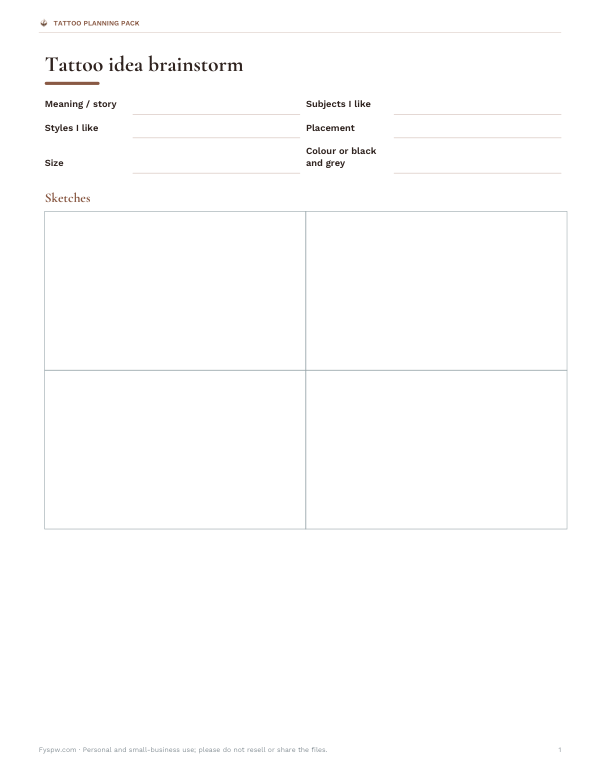
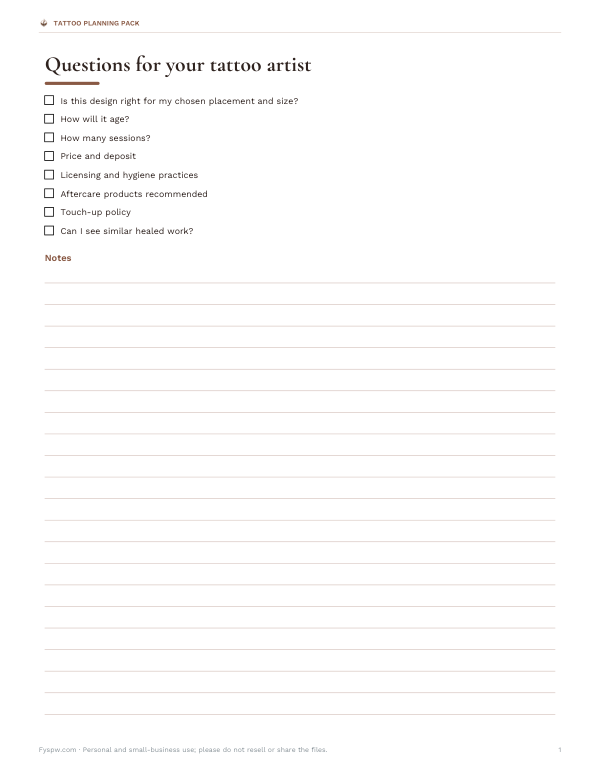
Printable tattoo placement body outline worksheet, a consultation questions checklist, an aftercare tracker, a tattoo idea brainstorming sheet and a budget/appointment log (Excel).
- Idea brainstorm (PDF/DOCX)
- Consultation checklist (PDF, DOCX)
- Aftercare tracker (XLSX)
- Budget log (XLSX)
Formats: PDF, DOCX, XLSX. Instant download after payment (link valid 72 hours, up to 5 downloads). AI-assisted: the templates were drafted with AI help and reviewed and laid out before publishing.
$3.00 USD, one-time 4 files · about $0.75 each
- Instant download
- 7-day refund
- Secure checkout by Stripe
7-day money-back guarantee. Full refund within 7 days of purchase, even after you download.
Free sample: Tattoo Aftercare Tracker (PDF, 50 KB)
Full refund within 7 days — see the refund policy and license.
Free printables
Single sheets you can print right now, no sign-up. The full pack adds every sheet in one download plus the editable files.
 Printable Tattoo Budget Log
What the generator makes
The generator creates original black line art, drawn mathematically in your browser — not copied from anyone else’s tattoo. Mandala and geometric designs stack rings of petals, dots, arcs, triangles and leaves with the symmetry you choose. Constellation designs turn each letter of a word into a star and join them with a dotted line, with the word set underneath. Pattern bands make repeating zigzag or wave borders for armbands and anklets. Press “New design” for a fresh variation and download an SVG to share.
From generated design to tattoo
- Generate a few designs and save the ones you like.
- Book a consultation with a licensed tattoo artist and bring your ideas.
- Let the artist adapt the design to your body — scale, flow and placement matter as much as the drawing.
- Expect the artist to redraw it in their own hand; that makes it tattoo-ready and personal.
- Agree on size, placement and line weight before the day.
- Follow the aftercare instructions your artist gives you.
Fine details can blur as skin ages. Artists often recommend simplifying very small designs or making them a little larger so lines stay crisp for years.
Choosing a style
| Style | Look | Good for |
|---|---|---|
| Fine line | Thin, delicate lines | Small, minimalist pieces |
| Geometric | Shapes, symmetry, precise lines | Mandalas, patterns, animals in facets |
| Dotwork | Shading built from dots | Mandalas, spiritual designs |
| Blackwork | Bold solid black areas | Patterns and graphic designs |
| Minimalist single line | One continuous line | Faces, animals, symbols |
| Botanical | Detailed plants and flowers | Forearm and shoulder pieces |
Placement guide
| Placement | Notes |
|---|---|
| Inner forearm | Easy to see; moderate pain; good for text and fine line |
| Wrist and ankle | Small designs; thin skin; bands and constellations |
| Behind the ear | Tiny designs; easy to hide |
| Collarbone | Script and fine line; bony area can be more painful |
| Shoulder blade | Larger mandalas; easy to hide |
| Upper arm | Versatile; heals well |
| Ribs | Large designs; often among the more painful spots |
| Spine | Long vertical designs; painful over bone |
Pain varies from person to person, but areas over bone or with thin skin are usually more sensitive.
Mandala symbolism and meaning
Mandalas are circular designs with roots in Hindu and Buddhist traditions, where they represent the universe and wholeness. In modern tattooing they are also chosen for balance, focus and personal meaning. If you use a design connected with a religious or cultural tradition, it is worth learning about it and wearing it respectfully.
Worked example
Someone wants a small tribute to their daughter, Luna. The constellation mode turns the four letters into four stars joined by a dotted line with “LUNA” underneath. They try fine-line weight, download the SVG, and take it to their artist, who suggests placing it along the inner wrist at about 2.5 inches wide, with the stars spaced slightly further apart so they stay distinct as the tattoo ages.
Line weight and ageing
Tattoo ink spreads slightly under the skin over the years, so very fine lines placed close together can blur into each other. Bolder lines and more open spacing hold up better, especially on hands, fingers and feet, where skin renews quickly and fades ink faster. Use the line weight setting to see how the same design looks in fine, medium and bold lines, and ask your artist which will age best at your chosen size and placement.
Customising a generated design
- Combine a mandala with a flower or animal at its centre.
- Use the constellation of a child’s or partner’s name as a delicate script alternative.
- Repeat a pattern band around an arm or ankle, adjusting repeats to fit the circumference.
- Ask your artist to add dotwork shading to give a line design depth.
- Print the SVG at the planned size to preview it on your skin with a temporary marker.
Things to consider before getting a tattoo
- Tattoos are long-lasting; removal is slow and costly.
- Choose a licensed studio with good hygiene and a strong portfolio.
- Avoid getting tattooed while unwell, sunburnt or after alcohol.
- Tell your artist about allergies, skin conditions or medications.
- Plan for healing time: about two to four weeks for the surface, longer for deeper layers.
- Sun protection keeps tattoos from fading.
Using designs you download
Designs made with the generator are original, and you are free to use them for personal tattoos and personal projects. Ideas are starting points: a skilled artist will turn them into something that works on skin.
Privacy
Designs are generated in your browser; nothing is uploaded or stored.
Frequently asked questions
Can I use the generated designs for a real tattoo?
Yes, as inspiration; your artist will adapt and redraw them for your skin.
Are the designs original?
Yes, they are generated mathematically in your browser.
How do I make a constellation tattoo of a name?
Choose constellation mode and type the name; each letter becomes a star.
What size should a fine-line tattoo be?
Large enough that lines won’t blur together over time; ask your artist.
What file do I get?
An SVG vector file that scales without losing quality.
Can I print the design at actual size?
Yes, open the SVG in any browser or design app and print it at the size you plan.
Does the generator make colour designs?
It makes black line art; your artist can add colour or shading.
How much does a small tattoo cost?
Prices vary by artist and location; many studios have a minimum charge, so ask for a quote.
Is anything stored?
No, it runs in your browser.